Check a bet slip right before you accept a bet: /outcomes?ids= returns each outcome's price, status and result now.
Settle./settlements?event_ids= lists every result of those events, oldest first.
Go real-time. Join the WebSocket with any Pusher client: app key 284f4b1f03a30d287df0, host ws.tifosports.com, login at https://api.tifosports.com/v1/ws/auth with the same key. Within 10 seconds the first message arrives:
That is feed.alive, the heartbeat. Prices, scores and results follow as they change; the WebSocket guide says what to do with each message, and the Socket recipes end with three sample clients that run with only your key.
Show the match. An event with has_tracker: true has a live match tracker: put its tracker_url from REST in an iframe on your page (Match tracker).
GET /v1/account shows when your trial ends (trial_ends_at); pay before then to keep the key working (Plans and billing). To see the data before you write code, open the live board or the settled results on the site.
Authentication, errors and limits
Your key
Send it on every call as Authorization: Bearer <key>. Never put it in a URL: URLs end up in logs and browser history.
One key per account. Making a new key on the dashboard revokes the old one at once.
The key sees every event of every sport on offer. A new account gets 14 days of Pro free, counted from the key's first API call (a REST call or a socket login), not from signup: sign up, read these docs and plan your work without losing a day.
After the trial, the key works while Pro is paid. Not paid, it stops: every call answers 402 payment_required. Paying switches the same key back on within minutes; nothing to change in your code (Plans and billing).
Your allowed IP
Each key works from one IP address (IPv4 or IPv6): your server's. Set it on your dashboard before the first call; you can change it there any time.
Every REST call and every socket login from another address answers 403 ip_not_allowed; the message names the address the call came from. A refused call does not start the trial.
Changing the address closes the key's open sockets within a minute; log in again from the new one.
Need a second address, for a backup server? Ask support.
Keep the key on your server. Browsers may call the API (any origin, no cookies), but a key in a web page is a key anyone can copy.
Errors
Every error has the same shape, and the HTTP status says what kind it is:
ResponseJSON
{"error": {"code": "unauthorized", "message": "Missing, unknown or revoked API key."}}
Status
code
What to do
400
bad_request
A parameter is wrong or missing. The message names it, for example `from` must be an ISO 8601 time such as 2026-10-03T18:00:00Z. Fix the call; retrying the same one fails again
401
unauthorized
Missing, unknown or revoked key
402
payment_required
The key has stopped: the trial ended, or a paid period and its grace days ended. Pay on your billing page; the same key works again within minutes. /status and /account still answer
403
ip_not_allowed
The call did not come from the key's allowed IP, or none is set yet. Set it on your dashboard
403
forbidden
A socket login for a channel other than private-feed.pro
404
not_found
No such object, or one the feed does not offer
405
bad_request
The API answers GET only
429
rate_limited
Over the request limit. Wait the Retry-After seconds, then go on
503
feed_down
The API cannot answer right now. Suspend your markets and retry in a moment
Read the status before the code: new codes can appear inside v1.
Limits
The same for every key, in the trial and paid:
Limit
Value
REST requests
120 a minute per key (X-RateLimit-Limit, X-RateLimit-Remaining on every response; 429 with Retry-After over it). A full start-up load (about 100 pages of 50 events with markets) takes about a minute; live goes by the socket
Sockets
2 open at once; a third login closes the oldest (WebSocket)
Allowed IPs
1 per key
Settled history
30 days
Ids per call
up to 50 (ids, event_ids, outcome_ids, market_ids)
Ask for compressed responses (Accept-Encoding: gzip, which most HTTP clients send by default): a page of events with markets comes many times smaller.
Data types and glossary
Ids
Every id is a number. Sports and countries have small ids (8 is football). Every other object has a 9+ digit id whose first digit names its type, so a mixed-up id answers 404, never another object:
First digit
Object
Where
1
Event
/events, event_id
2
League
/leagues, league.id
3
Market in the dictionary
/markets, market_id
4
Outcome
outcomes[].id, outcome_id
5
Team (or player)
/teams, home.id, away.id
6
Settlement
/settlements
7
A market on one event
markets[].id, event_market_id
Ids are stable: an event keeps its id from upcoming through live to closed, an outcome for the life of its event. Names are labels, never ids: map by id.
Event state
Value
Meaning
upcoming
On the prematch list
live
In play
suspended
Taken off before kick-off, may come back: every outcome suspended
closed
Off both lists: finished, abandoned or removed
Outcome status
Value
Meaning
open
Bettable
suspended
Offered, not bettable now (a goal, a red card, a dangerous attack)
closed
No longer offered
settled
Has a result
Outcome result
Value
Meaning
pending
No result yet
won
Won
lost
Lost
void
Stake back: void and push
Event stats
The scoreboard beyond the total score: each team's totals (home, away), then each period per team (periods: the period's score and stats), then the game in progress (current, e.g. tennis points and serve). null before kick-off. Period labels: 1H, 2H, ET1, ET2; Q1 to Q4, OT; P1 to P3; sets S1, S2, …; innings I1, I2, …. A sport shows only the stats it has.
Event has_tracker and tracker_url
has_tracker is true when the event has a live match tracker; REST's tracker_url is its address with your tracker key in it, for an iframe on your page (null without a tracker). The socket sends the flag only. See Match tracker.
Rules for every field
Times are ISO 8601 in UTC (2026-10-03T18:00:00Z).
Prices are decimal odds (1.91).
Missing values are null, never left out.
New values can appear inside v1: treat an unknown result as pending and an unknown status as suspended, and ignore fields you do not know.
Event lifecycle
An event moves through these states, keeping one id the whole way:
state
Markets
upcoming
Prematch markets, open
live
In-play markets; outcomes go suspended and back to open as play goes on; finished ones closed
suspended
Taken off before kick-off and may come back; every outcome suspended
closed
Nothing bettable; results keep arriving until every outcome is settled
Taken off before kick-off
Matches are sometimes taken off the board days or hours before they start, most often because they are postponed or rescheduled. Such an event becomes suspended: it keeps its id and its markets, every outcome turns suspended, and nothing is bettable. When the match is back, the event returns to upcoming with the same event, market and outcome ids and its outcomes open. If it is published again as a new event (a new date), the old one closes and the new one has its own id. If it is still not back 3 hours after the planned kick-off, it closes. Its bets stay pending; nothing is voided because time passed.
One event from prematch to final whistle
Some sources list the prematch match and the in-play match as two fixtures. The API joins them: you get one event id, and the outcome ids you saw before kick-off stay valid and settle under that id. After kick-off the event shows the in-play markets.
Suspensions
An outcome is suspended while it is offered but not bettable (a goal, a penalty, a dangerous attack), and open again when prices resume. closed means it is no longer offered on this event. Check status before you accept a bet: never take a bet on anything but open.
When the feed is late
/status says up, stale (live data is late: suspend your live markets) or down (suspend everything). The same status arrives on the socket every 10 seconds as feed.alive.
Closing the book on a match
Every event carries settlement: {"settled": …, "pending": …}. Results land after the final whistle, some markets earlier (a first half settles at half time). When pending is 0, the event is fully settled. A match that was not finished keeps its outcomes pending: the feed never voids because time passed, so apply your own void rule and deadline.
Map the dictionary and the teams to your own once, then every event arrives in terms you already know.
The market dictionary
/markets?sport=8 lists every market a sport can carry, the same for every plan. Each entry is a market (market_id on events) with name templates for its outcomes:
{home} and {away} are the teams, {line} the market's line, {player} a player. Markets with open-ended outcomes (players, correct score) list [].
has_line: true means the market comes in lines (Total Goals 2.5, 3.5, …).
A market on an event
On an event, each market is one line of one dictionary market:
Field
Meaning
id
This market on this event (first digit 7). Total Goals 2.5 and 3.5 are two markets with two ids
market_id
The dictionary entry, the same on every event of the sport
line
The total or handicap line; for a handicap, the home side's (-1.5 when the home team gives a goal and a half); null when the market has none
main
The line the source shows in event lists: 1X2, the main total, the main handicap. One main line per market
order, columns
Display order on an event page, and how many outcomes sit in a row
group
A tab for your event page: result, totals, handicap, periods, score, corners, cards, players, other; new groups may be added
Key your own markets by id, not by market_id + line: some events offer two markets with the same market_id and line at different prices, and they stay two markets.
Outcomes come in the source's display order, which is not always home first (the Money Line above lists the away team first). Match outcomes by id, or by the template in the dictionary, never by position.
Teams and leagues
/teams?sport= gives every team (or player) with a stable id, about 20,000, paged. Map "Man Utd" and "Manchester United" to one team by id once.
/leagues comes in menu order with its country; /countries in menu order too. Both are full lists: filter on your side.
When to call /v1/events
/v1/events does three jobs: the first load, staying up to date, and recovering after a gap.
When
Upcoming
Live
First load
events?sport=8&state=upcoming&markets=true, every page
events?sport=8&state=live&markets=true, every page
Running
The socket; or events?sport=8&state=upcoming&markets=true&since=<last call> every few minutes
The socket
After a disconnect
events?sport=8&markets=true&since=<last message time> once, and settlements?sport=8&since=<last settlement id>
The same, then the socket again
The socket is described in Real-time feed and the catch-up in Recover after a disconnect. Without the socket, keep live events current with events?sport=8&state=live&markets=true&since=<last call>: each call carries only what changed.
Light or with markets
Light (the default): each event's summary, with teams, league, start time, state, score, clock and settled / pending counts. Cheap: use it for fixture lists and menus. Up to 500 a page, 100 by default.
markets=true: each event with every market and outcome. Up to 50 a page, 10 by default, so a sport's upcoming odds take a few dozen calls, not one per event.
Only what changed: since
since=<ISO time> returns only events where something changed after that time: the score, clock, state, start time, or any outcome's price, status or result. With markets=true, each such event carries only its changed outcomes, inside their markets. Merge them into what you have, keeping the newer updated_at.
since must be within the last 24 hours. After a longer gap, do a first load again.
Use the server's clock: take server_time from /status, or the time of your last call minus a few seconds, so nothing falls between two calls.
Other filters
Parameter
Use
ids
Up to 50 events you already know
from, to
Start time window (ISO 8601; to exclusive). closed events go 30 days back
state
upcoming, live, suspended (taken off before kick-off, may come back) or closed; without it: all but closed ones older than 30 days
sport
One sport; leave it out for all
Pages come with meta.next_cursor; pass it back as cursor until it is null. The cursor is opaque: do not build or change it.
Settlement
Two endpoints, two questions:
Endpoint
Answers
Use it for
/outcomes
What is this outcome's price, status and result now?
Bet slips: before accepting a bet, after an in-play delay, grading a bet's legs
/settlements
What results did the feed send? The history, oldest first
Paying out, auditing an event, catching up after downtime
Results
Each row of /settlements is one outcome's result, and nothing else:
Field
Meaning
id
The settlement id: apply each once; since=<id> resumes after it
event_id
The event
outcome_id
The outcome: match it to your bets
result
won, lost or void (void covers void and push: stake back), or pending when a result the feed sent is withdrawn
A withdrawn result comes as a row with pending: undo what you paid on the earlier result. If the outcome is then settled again, a new row with the new result follows. A change from won to lost is simply a row with lost.
By ids:event_ids (up to 50) or outcome_ids (up to 50); market_ids narrows. For one match or one bet.
Catch-up:since, a settlement id: you get every result after it, for every sport (add sport to narrow it to one). Start with since=0 for the last 30 days, then keep the last id you processed and resume from it.
Settlement ids are opaque: they are not in size order, so never compare two ids. Rows come in the order they were sent; resume with since.
Applying them safely
Apply each row once. Store the settlement id you processed; a row you have seen before changes nothing.
Pay on won / lost / void, undo on pending. Never infer a result from a price or from status.
pending can last. Nothing settles because time passed: apply your own rules and deadlines.
The latest row wins. If you only need the state now, ask /outcomes: its result is already the outcome of every row.
Real-time feed (WebSocket)
One WebSocket connection brings every change as it happens: new events and markets, prices and outcome status, scores, clocks, stats and results. Load once over REST, then let the socket keep you current. Never poll live events.
Connect
The socket speaks the Pusher protocol, so any Pusher client works (JavaScript, PHP, Python, Java, Swift, .NET and more).
App key
284f4b1f03a30d287df0 (the same for every customer: it names our socket app, not you)
Host
ws.tifosports.com, port 443, TLS
Channel login
POST https://api.tifosports.com/v1/ws/auth with your Authorization: Bearer YOUR_KEY header, from the key's allowed IP
Without a Pusher library (any WebSocket client; the Python sample client does exactly this):
Open wss://ws.tifosports.com:443/app/284f4b1f03a30d287df0?protocol=7&client=my-app&version=1.0.
The first frame is {"event": "pusher:connection_established", "data": "{\"socket_id\": \"…\", …}"}. data is itself a JSON string, here and in every message: decode it twice.
Log in: POST https://api.tifosports.com/v1/ws/auth with your Authorization: Bearer YOUR_KEY header and the form body socket_id=<socket_id>&channel_name=private-feed.pro (application/x-www-form-urlencoded). It answers {"auth": "…", "channel_data": "…"}.
Send {"event": "pusher:subscribe", "data": {"channel": "private-feed.pro", "auth": "…", "channel_data": "…"}} with both values as they came. pusher_internal:subscription_succeeded confirms it.
Answer every pusher:ping with {"event": "pusher:pong", "data": {}}; pusher:error and pusher:subscription_error mean the join failed. Every frame whose event does not start with pusher is a feed message: event is its name (feed.alive, market.updated and so on) and the decoded data carries seq, at and the object.
2 sockets per key. A third login is never refused: it closes the key's oldest socket, so a reconnect, or a deploy that starts the new process before the old one stops, always gets in. Run at most two clients per key; a third keeps closing the others.
The login answers 403 ip_not_allowed from any address but the key's allowed IP, 402 payment_required once the key has stopped (trial or grace days over, nothing paid) and 403 forbidden for any other channel. Revoking the key, the end of the trial or the grace days, and a change of the allowed IP close the key's sockets within a minute.
One channel carries everything
Your channel carries every public sport, upcoming and live events, markets, stats, results and a heartbeat. If you offer only some sports, skip the rest by sport_id (in event.created: event.sport.id).
The objects are REST's: the same ids, field names and values as GET /v1/events/{id} and GET /v1/settlements. Created is whole, updated is short: a *.created message carries the whole object once; a *.updated message carries only the fields that change.
Message
What to do
event.created
Store the whole event: every market and its stats are inside. Sent again, whole, in the rare case its sport, country, league or team names change: replace yours
event.updated
Set the event's start_time, state, score and clock. state: closed: treat every market of the event as closed
market.created
Add the market to its event, or replace the one you hold
market.updated
Set price and status on each outcome listed (only the ones that changed)
stats.updated
Replace the event's stats
settlements
Settle each outcome by outcome_id; apply each id once. result: pending withdraws an earlier result
feed.alive
Every 10 seconds. stale: suspend your live markets. down: suspend everything
There are no remove messages. A market the source stops offering stays on its event with every outcome closed and may reopen later under the same ids. At kick-off and when an event closes, only the state goes out; markets follow only where they really changed. Every message and its fields are in the reference below.
Order: seq and at
Every message has seq, which rises by exactly 1 per message on your channel, and at, when we sent it (UTC with milliseconds; against your clock it is your delay).
seq is the last one plus 1: apply the message.
seq jumps ahead: you missed messages. Recover, then go on.
seq at or below one you applied: you have it already; drop it. If it is far below (it started again after a restart on our side), recover.
Heartbeat
feed.alive comes every 10 seconds, also when nothing else happens. No feed.alive for 30 seconds: treat the feed as down, suspend everything, reconnect and recover. GET https://api.tifosports.com/v1/status gives the same status over REST.
The client loop
Every client does the same few things: load once over REST, join the channel, and for each message check seq, apply it, remember seq and at.
Example
let lastSeq = null, lastAt = null;

function handle(name, data) {
  if (lastSeq !== null && data.seq <= lastSeq) return;             // had it already
  if (lastSeq !== null && data.seq !== lastSeq + 1) return recover(); // missed some
  apply(name, data);                                                // the table above
  lastSeq = data.seq;
  lastAt = data.at;
}
Hold the messages that arrive while you recover and apply them afterwards, dropping the ones the catch-up already covered (Recover after a disconnect).
Recover after a disconnect
Connections drop. Nothing is lost: REST has everything the socket sent, so a short catch-up puts you back exactly where the socket is.
When to recover
seq jumped: a message is missing.
The connection dropped and came back.
No feed.alive for 30 seconds (reconnect first).
seq went far below the last one you applied: the counter started again after a restart on our side.
Your own service restarted. With nothing stored, do a first load instead: the same calls without since.
The four steps
Hold new messages. Keep receiving, but put the socket's messages aside while you catch up.
Catch up the events. Ask for everything that changed since the last message you applied, with its at:
Each event comes with only its changed outcomes, inside their markets. Merge them into what you hold and keep the newer updated_at. Follow meta.next_cursor until it is null. Note the first page's meta.seq: the socket message this answer already covers.
Catch up the results. Ask for every result after the last settlement id you applied:
Apply each row once by id, as you do on the socket. A pending row withdraws an earlier result.
Go on with the socket. Apply the messages you held, dropping every one with seq at or below the meta.seq from step 2, and continue as normal.
Good to know
since reaches 24 hours back for events and 30 days for results. After a longer gap, do a first load.
Prices are a state, not a change: when REST and the socket disagree, the newer updated_at (or at) wins.
Suspend your markets while you recover if it takes more than a few seconds: you are not sure of the prices until step 4.
After a restart on our side every event may come once more as event.created: replace what you hold, as always.
Recovery after a long downtime and the first load are the same calls; only since differs.
Socket recipes for sportsbooks
Seven jobs every sportsbook does with the socket, each in a few lines. The sample clients at the end of this page do all of them; the code below is JavaScript, the same steps work in any language.
Keep a live coupon in sync
Load once over REST, then let the socket keep every event current. The objects are REST's, so one set of code reads both.
First load: GET https://api.tifosports.com/v1/events?markets=true&per_page=50 for the states you show (state takes one value: one load per state), every page. Note the first page's meta.seq of the first load: it is the lowest, and the later loads are newer still.
Join your channel and drop every message with seq at or below that meta.seq.
Apply each message:
Example
switch (name) {
  case 'event.created':  events.set(data.event.id, data.event); break;          // replace, never merge
  case 'market.created': upsertMarket(events.get(data.event_id), data.market); break;
  case 'market.updated': for (const o of data.outcomes) setOutcome(data.event_market_id, o.id, o.price, o.status); break;
  case 'event.updated':  Object.assign(events.get(data.event_id), pick(data, 'start_time', 'state', 'score', 'clock')); break;
}
A *.created message is the whole object: replace what you hold. A market.updated lists only the outcomes that changed: set their price and status and leave the others. A market never disappears; when it stops, its outcomes go closed, and it may come back later with the same ids.
Stop bets at the right moment
Take a bet on an outcome only when all of these hold:
the outcome's status is open (not suspended, closed or settled);
its event's state is upcoming or live, never suspended or closed;
the last feed.alive said up and came less than 30 seconds ago.
feed.alivestale means live prices may be behind: suspend your live markets and keep upcoming ones. down, or no feed.alive for 30 seconds: suspend everything, reconnect and recover. When the check passes, re-read the price at the moment of acceptance: the price you hold now is the price, not the one on the bet slip.
Show the match
event.updated carries score and clock on every change: a goal, a period, the clock starting or stopping. stats.updated carries the whole stats object (corners, cards, aces, fouls … by sport; names in the glossary): replace yours.
For the match itself on your page, use the tracker: has_tracker on event.created, the address from REST (Match tracker).
Run the clock yourself between updates instead of waiting for one every second:
clock is null before kick-off and after the end. Sports without a running clock (tennis and the other set sports, darts) send only its period, such as 2nd Set, with minute, seconds and runningnull: read stats for sets and games. In basketball and ice hockey running is null and countdown is true: the time left comes in 15-second steps, so show the last one.
Settle bets from the socket
A settlements message carries up to 100 rows, each {id, event_id, outcome_id, result}:
Example
for (const row of data.settlements) {
  if (applied.has(row.id)) continue;          // apply each id once
  applied.add(row.id);
  if (row.result === 'pending') ungrade(row.outcome_id);  // a result withdrawn
  else grade(row.outcome_id, row.result);                 // won, lost or void
  lastSettlementId = row.id;                              // where a catch-up starts
}
Match bets by outcome_id: it is the id the bet was placed on, before or during the match.
A pending row withdraws an earlier result of that outcome; a new row follows when it is settled again. Grade by the newest row.
Markets settle as soon as the match decides them, so many settle during play. An accumulator settles when its last leg does.
After a gap, GET https://api.tifosports.com/v1/settlements?since={last id} returns every row you missed (Recover after a disconnect).
Recover after a disconnect
Watch seq: it rises by exactly 1 per message. A jump, a dropped connection or 30 seconds without feed.alive means you may have missed something. Hold new messages, ask REST what changed since your last at and every result since your last settlement id, then go on from the catch-up's meta.seq. The four steps are in Recover after a disconnect; the sample clients do it in about 40 lines.
Take only the sports you offer
There is one channel, private-feed.pro, with every public sport. Skip what you do not offer:
Example
const offered = new Set([1, 4]);   // sport ids from GET https://api.tifosports.com/v1/sports
function wanted(name, data) {
  if (name === 'event.created') return offered.has(data.event.sport.id);
  if (name === 'feed.alive' || name === 'settlements') return true;
  return events.has(data.event_id);  // only events you kept
}
Keep the seq check on every message, skipped ones included: a gap is a gap whatever the sport. For settlements, keep the rows whose event_id you hold.
What happens at kick-off and when an event closes
Kick-off.event.updated with state: live comes at once, under the same event id as before. Then, as the live markets arrive, market.created for markets new to the event and market.updated for ones that changed; nothing for the rest. Markets that do not carry on in play go closed through market.updated. Bets you took before kick-off keep their outcome ids and settle by them.
Stats start with the first stats.updated after kick-off.
An event taken off before kick-off (most often postponed or rescheduled): event.updated with state: suspended, then its outcomes go suspended through market.updated. Nothing is bettable. When it is back, event.updated with state: upcoming and its outcomes open again, under the same ids. Not back 3 hours after the planned kick-off: it closes.
The end. Only event.updated with state: closed. Treat every market of a closed event as closed, whatever its outcomes say; results keep coming in settlements.
An event that comes back after closing (a match resumed): event.updated with upcoming or live, then only the markets that changed while it was closed.
Sample clients
Three small clients that do everything on this page: load over REST, join the channel, apply every message to the events they hold, print each one, and recover on a seq gap or a reconnect. Set LOF_KEY (your API key) and LOF_APP_KEY (284f4b1f03a30d287df0) and run.
A live match tracker for your event pages: the match drawn on a pitch or court as it is played. Put it on your site with one iframe.
Where the address comes from
Where
Field
What it is
GET /v1/events and GET /v1/events/{id}
has_tracker
true when the event has a tracker
GET /v1/events and GET /v1/events/{id}
tracker_url
The tracker's address with your tracker key in it, ready for the iframe; null when has_tracker is false
Socket event.created
has_tracker
The flag only, never the address
The address holds your own tracker key (?k=), so only REST sends it: the socket sends the same message to every customer. When an event.created arrives with has_tracker: true, read the event once:
The tracker often comes at kick-off, after the event was first sent. Then event.created comes again, whole, with has_tracker: true; event.updated never carries it. Without the socket, has_tracker and tracker_url are on every /v1/events page too.
Put it on your page
Use tracker_url as it is; do not change the address or drop ?k=. Any website may frame it: no domain to register.
Most sports (football, basketball, tennis, ice hockey …)
340
322
Cricket
400
401
Baseball, softball
520
423
The tracker follows the match by itself: no calls from your side while it runs. After the final whistle it shows the final; has_tracker stays true.
Your tracker key
It is on your dashboard, beside your API key, and already inside every tracker_url we send you.
It is public: it sits in your page source and opens only the tracker. Your API key never goes in a page.
A new API key gets a new tracker key. Read tracker_url again from REST after you make one.
It works while your API key works: in the trial or while Pro is paid. A frame that says Tracker not available has no key, an old key, or a key whose plan has stopped.
Views are counted per key, per day and per website that shows the tracker (the site's address only, never your visitors'), so a key copied to another site shows up.
Building a sportsbook on the feed
What the feed gives a sportsbook, and what stays your own rule.
Your job
The feed gives
You decide
Menu, lists, event pages
Sports, countries, leagues in menu order; events; markets with order, columns, main, group
Layout
Accept a bet
/outcomes?ids=: price and status, now
Price tolerance, in-play delay, stake limits
Settle singles
Each outcome's result (/settlements, the socket's settlements)
When to pay
Settle accumulators
Each leg's result
How a void leg counts (commonly as odds 1.00)
Undo a payout
A row with result: pending
How to claw back
Postponed or abandoned matches
state: suspended (taken off before kick-off, may come back) or closed; outcomes stay pending, never voided because time passed
Your void rules and deadlines
Not in the feed: bet placement, bet slips, ticket acceptance, liability, cash-out and bet-builder pricing. Those are your platform.
1. Menu, lists and event pages
Load /sports, /countries and /leagues once a day and show them in the order they come. For fixture lists without odds, call /events light; for lists with odds, /events?markets=true and show the markets with main: true. On an event page, show the markets sorted by order, tabbed by group, columns outcomes per row.
2. Accepting a bet
Right before you accept, ask /outcomes?ids= with every leg of the slip:
the price is the one the customer saw (or within your tolerance);
status is open (an outcome of a closed event is closed).
In play, wait your delay (often a few seconds), then ask again. Anything changed: reject or re-offer.
3. Settling
Catch up on /settlements?since= (or by event_ids) and apply each row once, by id. Pay singles on won / lost / void. Grade an accumulator when every leg has a result; a void leg usually counts as odds 1.00. On a row with result: pending, undo the payment of the result it withdraws; a new result follows later.
4. The hard cases
Postponed before kick-off: the event goes suspended with every outcome suspended; it comes back as upcoming with the same ids, or closes if it is not back 3 hours after the planned kick-off.
Abandoned: the event goes closed and its outcomes stay pending; your rules decide when a bet is void.
Feed trouble: when /status is stale, suspend live markets; when down, suspend everything.
Common issues and best practices
Symptom
Cause and fix
An event id answers 404
It does not exist, or it belongs to a sport the feed does not offer
/events?ids= returns fewer events than asked
Unknown ids are left out. Compare what you asked for with what came back; the same goes for /outcomes?ids=
403 ip_not_allowed
The call came from another address than the key's allowed IP (the message names it), or none is set. Set it on the dashboard; behind a NAT or a proxy, set the address your server's calls leave from
402 payment_required
The trial or the grace days are over and nothing is paid. Pay on the billing page; the same key works again within minutes
A socket closes soon after it connects
A third socket logged in with the same key and closed the oldest. Run at most two clients per key
since answers 400
It is more than 24 hours back, or not an ISO 8601 time. After a long gap, load from scratch
Changes are missing between two since calls
Your clock is ahead of the server's. Use server_time from /status, or start each since a few seconds before your last call
429 rate_limited
Over 120 requests a minute. Wait Retry-After seconds; use since, markets=true pages and the socket instead of one call per event
Times look hours off
Every time is UTC (Z). Convert to your time zone when you show it
An outcome you matched by name is wrong
Names are labels and can be reworded; outcomes are not always home first. Match by id
A market seems to appear twice
Two markets with the same market_id and line are two markets; key them by id
An outcome stays pending for days
A match that was not finished, or a result still being confirmed. The feed never voids because time passed
A value you have never seen
v1 adds values. Treat an unknown result as pending, an unknown status as suspended, and ignore unknown fields
Best practices
Cache the catalogue. Sports, countries, leagues, teams and the market dictionary change rarely: load them once a day.
Never poll per event. Use pages with markets=true and since, then the socket.
Keep the newer one. When REST and socket data meet, keep the row with the newer updated_at.
Apply settlements once, by id, and resume catch-up from the last id you processed.
Watch /status. Suspend live markets on stale and everything on down.
Keep the key on your server, and send Accept-Encoding: gzip.
Report a security issue
Found a weakness in the API, the socket or the site? Write to support@tifosports.com (also in security.txt) with the steps to see it. Please do not test against other customers' keys or data.
Plans and billing
One plan, Pro: every event in every sport, live and prematch, on one key. $750 a month, or $7,500 a year (2 months free, $625 a month). Paid in crypto (Bitcoin), by the calendar month or the year. No contract, no automatic charge. Prices: pricing.
The 14-day trial
14 days of full Pro, free, once per account and once per company. No payment to start.
The days start at your key's first API call (a REST call or a socket login from its allowed IP), not at signup. Sign up, read the docs, set your allowed IP and plan the work first.
Any 14 days hold two Saturdays and two Sundays: test the socket on a busy weekend evening.
GET /v1/account shows state: trial and trial_ends_at. We email you when the trial starts, 3 days before it ends and on its last day.
Pay any time during the trial: the paid month or year starts when the trial ends, so you lose no trial day. Not paid when it ends, the key stops: every call answers 402 payment_required and socket logins are refused, until you pay.
Pay, step by step
Open your billing page and pick Monthly (preselected) or Yearly (2 months free). The total is in US dollars.
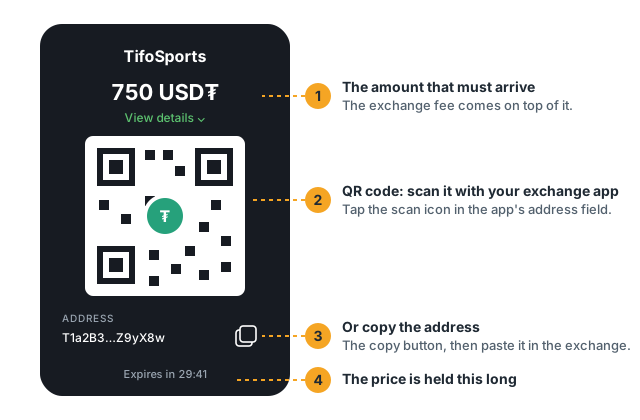
Continue to payment opens our checkout (BTCPay Server, open source, on our own domain). It shows the exact amount, the network and the address. The amount is held for 30 minutes.
Send the payment from your wallet or an exchange. From an exchange, set the amount the address must receive: the network fee comes on top. Send Bitcoin on the Bitcoin network only (not Lightning).
Come back to the invoice page (the checkout sends you there). It follows the payment live:
What you see
What it means
Waiting for your payment
Nothing has arrived yet. The countdown shows how long the amount is held.
Part of your payment arrived
Send the rest to the same address on the same network before the time ends.
Payment received. Pro is on.
The payment is on the network, not confirmed yet. Your key already works.
Paid. Pro until …
Confirmed. The receipt is in your email and on the page.
This payment time ended
Nothing arrived in time. A payment sent anyway is still matched for 2 hours.
We are checking your payment
A partial or very late payment: support contacts you within a day. Nothing is lost.
Your payment did not confirm
The network dropped or replaced the transaction: Pro pauses until a new payment.
Confirming
Pro starts as soon as your payment is seen on the network. It is final when the network confirms it: usually 10 to 30 minutes for Bitcoin (longer when the network is busy). If a payment never confirms, Pro pauses, we email you, and your next payments give Pro only once they confirm.
When your key works
state
When
The key
trial
14 days from the first call
Works: every event, REST and socket
pro
Paid days
Works
grace
7 days after the paid days end
Works; pay to go on without a break
stopped
After the trial or the grace days, nothing paid
Every call but /status and /account answers 402 payment_required; socket logins answer 402; open sockets close within a minute
The key stays the same through every step: paying a stopped key switches it back on within minutes, nothing to redeploy. Log in to the socket again after paying.
Watch the end from your system
GET /v1/account says when the key would stop: state (trial, pro, grace or stopped), trial_ends_at, interval, ends_at, grace_until, confirming and renew_url. Alert yourself a week ahead:
curlREST
curl-s-H"Authorization: Bearer YOUR_KEY""https://api.tifosports.com/v1/account" \
| jq -r'.data | (.ends_at // .trial_ends_at) as $end | select($end != null) | select(($end | fromdateiso8601) - now < 7*86400) | "The key stops after \($end): pay at \(.renew_url)"'
Renewal, monthly or yearly, grace
Reminders by email 7, 3 and 1 day before the end, with a Renew button. Switch them off on your billing page if you will not renew.
Renew early any time: the next month or year starts when the current one ends, so you never lose a day.
Switch between monthly and yearly when you pay the next period. There is no change in the middle of a period.
A month runs from a day to the same day of the next month (12 October to 12 November; from 31 January the next ends 28 February). A year is twelve such months.
Grace: not renewed, your key keeps working for 7 more days. Paying in those days starts the new period at the old end. Then the key stops until you pay.
Receipts and payment details
Every confirmed payment has a receipt (PDF) with your company details: add your company, address, country, tax number and billing emails on the billing page (new receipts use them). Before paying, your finance team can download a pro-forma; it is not a receipt. Your history lists every invoice with its transaction, and downloads as CSV.
When something goes wrong
Short: send the rest before the time ends. A payment up to 3% short counts in full.
Late: a full payment within 2 hours of the invoice time counts at the held price; later, support contacts you.
Twice: both count (two periods, or an extra support settles with you).
Wrong network or coin: write to support with the invoice number and the transaction. We help, but cannot promise to recover funds sent where the checkout did not show.
Payments are final; to stop, simply do not pay the next month. Questions: reply to any billing email, or use the support links on the dashboard.
Paying from an exchange
Most customers pay from an exchange account (Binance, OKX, Bybit or another). That works well. Three things decide whether the payment lands: the network, the amount that arrives, and the time. This page walks through them, then the exact taps on the biggest exchanges. Start from your billing page: Go Pro, pick monthly or yearly, Continue to payment.
The three rules
The network. Bitcoin only on the Bitcoin network (not BEP20, not Lightning). The payment page shows the network under the amount. A payment on another network does not arrive here and may be lost.
The amount that arrives. The address must receive the full amount the payment page shows. Exchanges take their fee from what you type unless you tell them otherwise: on Binance choose Receive amount and type the amount from the payment page; elsewhere type that amount plus the fee the exchange shows. Up to 3% short still counts in full.
The time. The payment page holds the price for 30 minutes. Exchanges sometimes hold a withdrawal for a security check, above all the first one to a new address. A payment you sent in time that arrives up to 2 hours after the page's time still counts by itself; later, support sorts it out with you.
Use the address shown on this payment page, every time: it can change from one payment to the next. Do not save it in your exchange's whitelist for later payments.
Copy or scan the address
Copy: the copy button next to the address on the payment page, then paste it into the exchange's address field. Check the first and last four characters after pasting.
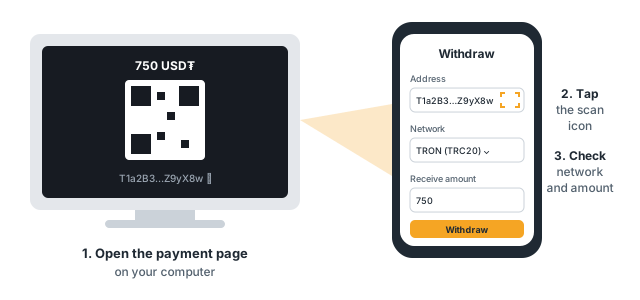
Scan: open the payment page on your computer; in your exchange app's withdraw screen, tap the scan icon in the address field and point the phone at the QR code. Check the address it filled in, then choose the network and the amount yourself.
Binance
App (Binance's own steps, September 2026):
Assets → Overview → Send → Withdraw Asset.
Choose BTC and the account to send from.
Paste or scan the address. Choose the network: Bitcoin.
Amount: choose Receive amount and type exactly the amount from the payment page. The app shows the fee on top.
Withdraw, check the address and the network, slide to confirm, then your passkey or 2FA. The first withdrawal to an address shows a safety notice: that is normal.
Website:Assets → Overview → Withdraw → Withdraw Asset → the coin → Address: paste it, check the network → the amount → Withdraw → Confirm → Continue → the security checks.
OKX
Assets → Withdraw → Withdraw crypto (on-chain), then BTC.
Paste or scan the address and choose the network: Bitcoin.
Type the amount so that what arrives is the amount on the payment page (OKX shows its fee and the minimum).
2FA, then confirm. The status goes Pending → Withdrawing → Completed.
OKX asks for identity verification before the first withdrawal.
Bybit
Assets → Funding account → Withdraw. Coins in the Unified Trading Account move to Funding first.
Search BTC, paste or scan the address, choose the network Bitcoin and the amount so that the payment page's amount arrives.
Withdraw, then the email or phone code and Google Authenticator. Bybit may take up to an hour to send.
Any other exchange
The same three rules: withdraw (sometimes "send" or "transfer out") on-chain, the address from the payment page, the network Bitcoin, and an amount that makes the payment page's amount arrive after the exchange's fee.
Afraid of sending it all at once? Send a little first
You can split one payment: send a small amount first, see it arrive, then send the rest to the same payment page.
Send a small amount, above your exchange's minimum.
Wait until the payment page says Part of your payment arrived; it shows how much is left.
Send exactly what is left, on the same network. Pro starts when the whole amount is there.
Send the rest before the page's time ends; if your exchange holds it, it still counts when it arrives within 2 hours of that time. Each withdrawal costs the exchange's fee again. Do not send a test to an old payment page: open a new one from your billing page.
After you send
The invoice page (the payment page sends you back to it) follows the payment live: Payment received. Pro is on. as soon as it is on the network, then Paid when it confirms, usually 10 to 30 minutes for Bitcoin. The receipt comes by email. Keep the transaction id (TXID) from your exchange's history: support asks for it if anything looks wrong.
Sent on the wrong network or the wrong coin? Write to support with the invoice number and the TXID. We help where we can, but cannot promise to recover funds sent where the payment page did not show.
API reference
Every endpoint, open. Pick the language of the code samples once; every sample follows.
Feed
Is the feed healthy, and what is this key allowed to do.
GET/v1/statusKey required
Feed health and the clock
up, stale (data is late: suspend your live markets) or down (suspend everything), the server clock
and the key's plan. Compare server_time with your own clock before you use since.
The same status arrives on the socket every 10 seconds as feed.alive. It still answers when the key
has stopped (after the trial or the grace days), so your monitoring keeps working.
403The call did not come from the key's allowed IP, or the key has no allowed IP yet. Set it on your
dashboard; the message names the address the call came from. A call refused here does not start the trial.
429Over 120 requests a minute. Wait Retry-After seconds.
GET/v1/accountKey required
Your plan and usage
The key's state (trial, paid, grace or stopped), when the trial, the paid days and the grace end, the
allowed IP, how many requests the key made today and this month, and its open sockets. For your own
monitoring: alert yourself a week before trial_ends_at or ends_at. It still answers when the key
has stopped, so you can see why.
403The call did not come from the key's allowed IP, or the key has no allowed IP yet. Set it on your
dashboard; the message names the address the call came from. A call refused here does not start the trial.
429Over 120 requests a minute. Wait Retry-After seconds.
POST/v1/ws/authKey required
Socket login
The login your Pusher client calls to join a private channel of the WebSocket (asyncapi.yaml). You do
not call it by hand: point the client's channel authorization at this URL with your
Authorization: Bearer <key> header, and it sends the form below and uses the answer. Without a Pusher
library, post the form yourself and subscribe with the answer (the docs' Real-time feed guide, "Without a
Pusher library").
Join private-feed.pro. The login comes from your server, so it must come from the key's allowed IP
(403 ip_not_allowed otherwise), and a stopped key answers 402 payment_required.
2 sockets per key. A third login is never refused: it closes the key's oldest socket, so a
reconnect or a deploy that starts the new process before the old one stops always gets in. Run at most
two clients per key, or they keep closing each other. Revoking the key, the end of the trial or the
grace days, and a change of the allowed IP close the key's sockets within a minute.
{
    "error": {
        "code": "ip_not_allowed",
        "message": "This key works only from its allowed IP; this call came from 198.51.100.7. Change the allowed IP on your dashboard."
    }
}
400A parameter is missing, malformed or out of range (a "must give" rule, more than 50 ids, since older than 24 hours, a bad cursor).
401Missing, unknown or revoked key.
402The key has stopped: the 14-day trial ended, or a paid period and its grace days ended, and nothing is
paid. Pay on your billing page (renew_url in GET /v1/account); the same key works again within
minutes. /status and /account still answer.
403ip_not_allowed: the login did not come from the key's allowed IP. forbidden: a channel other than
private-feed.pro.
429Over 120 requests a minute. Wait Retry-After seconds.
503The feed is down or the API cannot answer right now. Suspend your markets and retry.
Catalogue
The menu and the dictionary. Call once, cache, filter on your side.
GET/v1/sportsKey required
Supported sports
The sports the feed settles, with how many events each has on offer for this key. Sorted by menu order.
402The key has stopped: the 14-day trial ended, or a paid period and its grace days ended, and nothing is
paid. Pay on your billing page (renew_url in GET /v1/account); the same key works again within
minutes. /status and /account still answer.
403The call did not come from the key's allowed IP, or the key has no allowed IP yet. Set it on your
dashboard; the message names the address the call came from. A call refused here does not start the trial.
429Over 120 requests a minute. Wait Retry-After seconds.
GET/v1/countriesKey required
Countries (and regions)
Every country, about 150, in one call, in the menu order of a sportsbook (sport → country → league).
International competitions sit under regions such as World. A country's id is the
same in every sport. No filter, no paging.
402The key has stopped: the 14-day trial ended, or a paid period and its grace days ended, and nothing is
paid. Pay on your billing page (renew_url in GET /v1/account); the same key works again within
minutes. /status and /account still answer.
403The call did not come from the key's allowed IP, or the key has no allowed IP yet. Set it on your
dashboard; the message names the address the call came from. A call refused here does not start the trial.
429Over 120 requests a minute. Wait Retry-After seconds.
GET/v1/leaguesKey required
Leagues
Every league (about 2,200) with its country, its menu order and how many events it has on offer for
this key. Build the country and league menus from this and /countries.
Parameter
Type
Description
sportquery
integer
Sport id (from /sports, e.g. 8 for football). Optional; leave it out for every sport.
400A parameter is missing, malformed or out of range (a "must give" rule, more than 50 ids, since older than 24 hours, a bad cursor).
401Missing, unknown or revoked key.
402The key has stopped: the 14-day trial ended, or a paid period and its grace days ended, and nothing is
paid. Pay on your billing page (renew_url in GET /v1/account); the same key works again within
minutes. /status and /account still answer.
403The call did not come from the key's allowed IP, or the key has no allowed IP yet. Set it on your
dashboard; the message names the address the call came from. A call refused here does not start the trial.
429Over 120 requests a minute. Wait Retry-After seconds.
GET/v1/teamsKey required
Teams and players
Teams (players in individual sports) with a stable id, so you map each to your own once instead of
matching names ("Man Utd" and "Manchester United"). About 20,000; paged.
Parameter
Type
Description
sportquery
integer
Sport id (from /sports, e.g. 8 for football). Optional; leave it out for every sport.
cursorquery
string
The meta.next_cursor of the previous page. Opaque; do not build or change it. Empty or left out for the first page.
400A parameter is missing, malformed or out of range (a "must give" rule, more than 50 ids, since older than 24 hours, a bad cursor).
401Missing, unknown or revoked key.
402The key has stopped: the 14-day trial ended, or a paid period and its grace days ended, and nothing is
paid. Pay on your billing page (renew_url in GET /v1/account); the same key works again within
minutes. /status and /account still answer.
403The call did not come from the key's allowed IP, or the key has no allowed IP yet. Set it on your
dashboard; the message names the address the call came from. A call refused here does not start the trial.
429Over 120 requests a minute. Wait Retry-After seconds.
GET/v1/marketsKey required
Market dictionary
Every market a sport can carry (Match Result, Total Goals, Handicap, …), so you map ours to yours once,
before the first event arrives. Outcome names are templates ({home}, {away}, {line}, {player});
markets with open-ended outcomes (players, correct score) list []. The same for every plan.
A market on an event is a market_id plus a line.
Parameter
Type
Description
sportquery
integer
Sport id (from /sports, e.g. 8 for football). Optional; leave it out for every sport.
cursorquery
string
The meta.next_cursor of the previous page. Opaque; do not build or change it. Empty or left out for the first page.
400A parameter is missing, malformed or out of range (a "must give" rule, more than 50 ids, since older than 24 hours, a bad cursor).
401Missing, unknown or revoked key.
402The key has stopped: the 14-day trial ended, or a paid period and its grace days ended, and nothing is
paid. Pay on your billing page (renew_url in GET /v1/account); the same key works again within
minutes. /status and /account still answer.
403The call did not come from the key's allowed IP, or the key has no allowed IP yet. Set it on your
dashboard; the message names the address the call came from. A call refused here does not start the trial.
429Over 120 requests a minute. Wait Retry-After seconds.
Events
Events and their odds, soonest first.
GET/v1/eventsKey required
Events
Events, soonest first, paged. Light by default: each event's summary (teams, league, start time,
state, score, clock, settled and pending counts), no markets. markets=true adds every market and
outcome, so a sport's upcoming odds take a few dozen calls, not one per event.
All filters are optional and combine.
since returns only events where anything changed after that time: the score, clock, state, start
time, or any outcome's price, status or result. With markets=true each such event carries only its
changed outcomes (inside their markets), so recovery and polling stay small. since must be within
the last 24 hours.
meta.seq (the same on every page) is the socket channel's seq (private-feed.pro) when the first
page was built: resume the socket after it and drop messages at or below it.
A prematch fixture and its live twin are one event under the prematch id, carrying the live score,
clock and odds after kick-off. Outcome ids from before kick-off stay valid.
When to call it: start-up (state=upcoming or live, markets=true, all pages), running (upcoming:
the socket, or poll with since every few minutes; live: the socket only), after a disconnect
(since=<time of the last message> once).
Parameter
Type
Description
sportquery
integer
Sport id (from /sports, e.g. 8 for football). Optional; leave it out for every sport.
statequery
EventState
upcoming (on the prematch list), live (in play), suspended (taken off before kick-off, may come
back), closed (finished or removed; at most 30 days back). Without state: upcoming, live and
suspended events, and closed ones of the last 30 days.
fromquery
string
Start time, inclusive. ISO 8601.
toquery
string
Start time, exclusive. ISO 8601.
idsquery
string
Up to 50 event ids, comma separated. Ids that do not exist or are not visible to this key are left out.
sincequery
string
Only events where anything changed after this time (ISO 8601, at most 24 hours back).
marketsquery
boolean
true adds every market and outcome to each event.
cursorquery
string
The meta.next_cursor of the previous page. Opaque; do not build or change it. Empty or left out for the first page.
per_pagequery
integer
Events per page. Default 100 without markets and 10 with markets=true; at most 500 without markets
and 50 with them.
400A parameter is missing, malformed or out of range (a "must give" rule, more than 50 ids, since older than 24 hours, a bad cursor).
401Missing, unknown or revoked key.
402The key has stopped: the 14-day trial ended, or a paid period and its grace days ended, and nothing is
paid. Pay on your billing page (renew_url in GET /v1/account); the same key works again within
minutes. /status and /account still answer.
403The call did not come from the key's allowed IP, or the key has no allowed IP yet. Set it on your
dashboard; the message names the address the call came from. A call refused here does not start the trial.
429Over 120 requests a minute. Wait Retry-After seconds.
503The feed is down or the API cannot answer right now. Suspend your markets and retry.
GET/v1/events/{id}Key required
One event
The event with every market and outcome, in display order. A prematch fixture and its live twin are one
event: the prematch id keeps working after kick-off. Answers 404 for an unknown event and for an event
this key may not see.
402The key has stopped: the 14-day trial ended, or a paid period and its grace days ended, and nothing is
paid. Pay on your billing page (renew_url in GET /v1/account); the same key works again within
minutes. /status and /account still answer.
403The call did not come from the key's allowed IP, or the key has no allowed IP yet. Set it on your
dashboard; the message names the address the call came from. A call refused here does not start the trial.
404No such object, or one the feed does not offer.
429Over 120 requests a minute. Wait Retry-After seconds.
503The feed is down or the API cannot answer right now. Suspend your markets and retry.
Outcomes
The state of single outcomes now, for bet slips.
GET/v1/outcomesKey required
Outcomes now (bet slips)
The state of outcomes now: price, status and result. Read straight from the source of truth,
never cached. It is the call behind a bet slip:
before accepting a bet: same price, statusopen (an outcome of a closed event is closed);
after an in-play delay: check again;
afterwards: the result of each leg.
Give idsorevent_ids (at least one; both is allowed and narrows). market_ids narrows further.
Ids that do not exist or are not visible to this key are left out of data, so compare what you asked
for with what came back.
For the history of results use /settlements.
Parameter
Type
Description
idsquery
string
Up to 50 outcome ids, comma separated. Must giveids or event_ids.
event_idsquery
string
Up to 50 event ids, comma separated; every outcome of those events (paged). Must giveids or event_ids.
market_idsquery
string
Up to 50 market ids (from /markets); narrows to those markets.
cursorquery
string
The meta.next_cursor of the previous page. Opaque; do not build or change it. Empty or left out for the first page.
400A parameter is missing, malformed or out of range (a "must give" rule, more than 50 ids, since older than 24 hours, a bad cursor).
401Missing, unknown or revoked key.
402The key has stopped: the 14-day trial ended, or a paid period and its grace days ended, and nothing is
paid. Pay on your billing page (renew_url in GET /v1/account); the same key works again within
minutes. /status and /account still answer.
403The call did not come from the key's allowed IP, or the key has no allowed IP yet. Set it on your
dashboard; the message names the address the call came from. A call refused here does not start the trial.
429Over 120 requests a minute. Wait Retry-After seconds.
503The feed is down or the API cannot answer right now. Suspend your markets and retry.
Settlements
The history of results: every settlement and rollback, oldest first.
GET/v1/settlementsKey required
Results
Every result the feed sent, oldest first, paged, for the last 30 days. Ask in one of two ways:
By ids:event_ids (up to 50) or outcome_ids (up to 50); market_ids narrows. Use it to audit
an event or to grade the legs of a bet.
Catch-up:since, a settlement id: every result after it (every sport, or one sport), for
example after a disconnect or downtime; since=0 for the whole 30 days the first time. Resume from the
last id you processed.
Anything else answers 400 bad_request.
Each row is one outcome's result and nothing else: won, lost, void (void and push, stake back), or
pending when a result we sent is withdrawn (a new result follows later). A change from won to lost is
simply a row with lost. Match rows to your bets by outcome_id; apply each id once. id is opaque
(do not compare ids by size): rows come in the order they happened, here and on the socket, and
since=<id> resumes after one.
Nothing settles because time passed: a match with no result keeps its outcomes pending.
Parameter
Type
Description
event_idsquery
string
Up to 50 event ids, comma separated.
outcome_idsquery
string
Up to 50 outcome ids, comma separated.
market_idsquery
string
Up to 50 market ids (from /markets); narrows an event_ids or outcome_ids request.
sportquery
integer
Sport id; narrows a catch-up to one sport.
sincequery
integer
A settlement id: only results after it; 0 for the whole history.
cursorquery
string
The meta.next_cursor of the previous page. Opaque; do not build or change it. Empty or left out for the first page.
400A parameter is missing, malformed or out of range (a "must give" rule, more than 50 ids, since older than 24 hours, a bad cursor).
401Missing, unknown or revoked key.
402The key has stopped: the 14-day trial ended, or a paid period and its grace days ended, and nothing is
paid. Pay on your billing page (renew_url in GET /v1/account); the same key works again within
minutes. /status and /account still answer.
403The call did not come from the key's allowed IP, or the key has no allowed IP yet. Set it on your
dashboard; the message names the address the call came from. A call refused here does not start the trial.
429Over 120 requests a minute. Wait Retry-After seconds.
503The feed is down or the API cannot answer right now. Suspend your markets and retry.
WebSocket
Prematch and live odds, scores, stats and settlements as they happen, over one WebSocket connection.
The objects are REST's. Events, markets, outcomes and settlements on the socket use the ids and field names
of GET /v1/events/{id} and GET /v1/settlements (openapi.yaml); updates and settlements carry only the
fields that matter for them. So you can start from REST, keep it current from the socket, and recover through
REST after a gap.
Connecting. Pusher protocol (the socket server is Reverb): use any Pusher client with the app key shown
on the docs page (the same for every customer; it names our socket app, not you), host ws.{domain},
port 443, TLS. Authorise private channels at POST https://api.{domain}/v1/ws/auth with your
Authorization: Bearer <key> header, from the key's allowed IP (403 ip_not_allowed otherwise); a stopped
key (trial or grace days over, nothing paid) answers 402 payment_required. 2 open sockets per key: a
third login closes the key's oldest socket instead of being refused, so a reconnect or a deploy overlap always
gets in; run at most two clients per key. Revoking the key, the end of the trial or the grace days, and a
change of the allowed IP close the key's sockets within a minute.
One channel, everything on it.private-feed.pro. It carries every public sport, upcoming and live
events, markets, stats, settlements and feed.alive. Offer only some sports? Skip messages by sport_id (in
event.created: event.sport.id).
Created is whole, updated is short.*.created carries the whole object once. *.updated carries only
what changes during a match, always the same few fields, so it is quick to handle and light on bandwidth.
What you do with each message.
event.created: store the whole event (it carries every market and its stats). It is sent again, whole,
in the rare case the event's sport, country, league or team names change: replace what you hold.
event.updated: set the event's start_time, state, score and clock.
market.created: add the market to its event, or replace it if you hold it (it is sent again, whole, in the
rare case a market gains an outcome or its name, line, order, columns or main flag change).
market.updated: set price and status on each outcome listed (only the outcomes that changed).
stats.updated: replace the event's stats.
settlements: settle those outcomes; result: pending withdraws an earlier result.
feed.alive: every 10 s. stale: suspend your live markets. down, or no feed.alive for 30 s: suspend
everything and reconnect.
What we send, and when. Only what really changed. A state change (kick-off, close, comeback) sends only
the state; kick-off and comeback then send only the markets the new data really changed. A market the source
deletes stays in your event with every outcome closed and may reopen under the same ids; there are no remove
messages. A closed event (state: closed) gets no market messages: treat all its markets as closed.
Order and gaps. Every message has seq (rises by exactly 1 per message on the channel) and at (when we
sent it, ISO 8601 UTC with milliseconds). A jump in seq, or a reconnect: call
GET /v1/events?markets=true&since=<at of the last message you processed> and
GET /v1/settlements?since=<your last settlement id>, apply both, then continue from the events response's
meta.seq, dropping messages at or below it. Prices are a state: the newest wins.
284f4b1f03a30d287df0 (the same for every customer)
Host
ws.tifosports.com, wss, port 443
Channel login
POST https://api.tifosports.com/v1/ws/auth with your Authorization: Bearer key
Channel
Carries
private-feed.pro
Every event of every public sport, upcoming and live. Every key may join (trial or paid).
event.created
A new event
The whole event in one message, every market and its stats inside.
Sent when an event is new to the channel: a new upcoming event, or an event that starts straight in
live. Sent again, whole, in the rare case its sport, country,
league or team names change; replace what you hold. The event is REST's GET /v1/events/{id} object (its stats are null before kick-off) without tracker_url:
has_tracker says whether it has a match tracker, and the event is sent again, whole, when that turns true
(the tracker often comes at kick-off). The address holds your own tracker key, so it comes from REST only.
Sent when one of start_time, state, score, clock changed: always these fields, with REST's names and
values, nothing else. Kick-off, close and comeback send this message only; markets follow
only where they really changed. state: closed means every market of the event is closed. state: suspended
means the event was taken off before kick-off and may come back: its outcomes follow as suspended
(market.updated), and when it returns state: upcoming comes with the outcomes open again.
The clock goes out on every change: it starts or stops, changes period, is shown or hidden, or its time
changes by a second or more (a referee adding 2 or 3 seconds included). Between those, run it yourself from
clock.seconds at at while clock.running. A resend of the same time sends nothing. Basketball and ice
hockey: the source gives only the time left in 15-second steps, without a running flag, so every step goes
out (running is null, countdown is true).
The stats object of one event (score per period, the current game, team stats).
Sent when anything in the event's stats changed: a corner, a card, a tennis point, the serve, a period
score. The whole object, as the source sends it on every change, so a missed message cannot leave wrong
totals.
A market new to our database: a new line in play (Total Goals 4.5 after a goal), a new market found before
kick-off, the live markets at a kick-off where the source starts a second fixture for the match. A new
event's markets come inside event.created instead. Sent again, whole, when a market you hold gains an
outcome or its name, line, order, columns or main flag change (rare); replace yours.
Only the outcomes that changed, with their price and status.
A price changed, outcomes were suspended or reopened, or the market closed (the source deleted it: every
outcome closed, sent once) and later reopened (the same ids, open / suspended again). Every change of
one source update is in one message, so a market's prices never arrive half-changed. Not sent for results:
a settled outcome comes in settlements.
Up to 100 results per message, the result and nothing else.
Whenever outcomes get a result, they go out in pages of up to 100, in order (5 results: one message with
5; 250: 100, 100, 50). Every element is one outcome, always the same four fields; one message can hold
several events. Match them to your bets by outcome_id; apply each id once. A result withdrawn later
comes as the same outcome with result: pending; if it is then settled again, a new element with the new
result follows. The same rows as REST GET /v1/settlements.
Every object the API returns, field by field. A field that can be empty is null, never left out.
Error
Field
Type
Description
erroralways
object
PageMeta
Field
Type
Description
per_pagealways
integer
The page size used.
next_cursoralways
string | null
Pass it back as cursor for the next page; null on the last page.
Status
Field
Type
Description
statusalways
up · stale · down
up; stale: live data is late, suspend your live markets; down: suspend everything.
updated_atalways
string | null
When the newest live data arrived; null while nothing is in play.
server_timealways
string
planalways
Plan
One plan. A trial key is Pro too; state in GET /v1/account tells trial from paid.
Plan
One plan. A trial key is Pro too; state in GET /v1/account tells trial from paid.
Field
Type
Description
values
pro
Account
Field
Type
Description
planalways
Plan
One plan. A trial key is Pro too; state in GET /v1/account tells trial from paid.
statealways
trial · pro · grace · stopped
trial during the 14 free days; pro while paid days run; grace after they end, when the key keeps
working until grace_until; stopped after the trial or the grace days with nothing paid: every
call but /status and /account answers 402 payment_required.
trial_ends_atalways
string | null
When the trial ends (or ended): 14 days after the key's first call, set by that call. Stays after you
pay. One trial per account and per company.
intervalalways
string | null
The last period bought, monthly or yearly; null before the first payment.
ends_atalways
string | null
When the paid days end (grace starts then); null before the first payment.
grace_untilalways
string | null
When the key stops if nothing is paid; null before the first payment.
confirmingalways
boolean
A payment was seen and Pro is on, but the payment is not confirmed yet.
renew_urlalways
string
Where to pay the next month or year.
allowed_ipsalways
list of string
The addresses the key works from: one, set on your dashboard (empty until you set it). A second only
by support, for a backup server.
keyalways
object
requestsalways
object
socketsalways
object
Sport
Field
Type
Description
idalways
integer
The sport's id, a small number.
namealways
string
eventsalways
EventCounts
SportRef
The event's sport, like its league and teams.
Field
Type
Description
idalways
integer
The sport id (see /sports).
namealways
string
EventCounts
Field
Type
Description
upcomingalways
integer
livealways
integer
Country
Field
Type
Description
idalways
integer
The country's id, a small number, the same in every sport.
namealways
string
orderalways
integer
Menu order.
CountryRef
Field
Type
Description
idalways
integer
namealways
string
LeagueRef
Field
Type
Description
idalways
integer
namealways
string
League
Field
Type
Description
idalways
integer
namealways
string
sportalways
integer
The sport id (see /sports).
orderalways
integer
Menu order within its sport.
countryalways
CountryRef | null
eventsalways
EventCounts
Team
Field
Type
Description
idalways
integer
Stable across events.
namealways
string
sportalways
integer
The sport id (see /sports).
TeamRef
Field
Type
Description
idalways
integer
namealways
string
MarketDefinition
Field
Type
Description
idalways
integer
The market_id seen on every event of the sport.
sportalways
integer
The sport id (see /sports).
namealways
string
groupalways
string
The tab on an event page: result, totals, handicap, periods, score, corners, cards, players, other; new groups may be added.
orderalways
integer
has_linealways
boolean
outcomesalways
list of string
Outcome name templates ({home}, {away}, {line}, {player}); [] for open-ended markets.
EventState
upcoming: on the prematch list. live: on the live list. suspended: taken off the prematch list
before kick-off and may come back (often a postponed or rescheduled match); every outcome is suspended,
nothing is bettable, and it goes back to upcoming with the same ids when it returns. closed: on
neither (finished, abandoned, or not back by 3 hours after the planned kick-off).
Field
Type
Description
values
upcoming · live · suspended · closed
Score
Current or final score; null before kick-off.
Field
Type
Description
homealways
integer | null
awayalways
integer | null
Clock
The clock while in play; null otherwise. Sports without a running clock (tennis and the other set sports,
darts) carry only period (such as 2nd Set, Leg 9), with minute, seconds and runningnull.
Run it yourself between updates: add the time since you got it to seconds while running
(subtract it when countdown).
Field
Type
Description
periodalways
string
minutealways
integer | null
Minute played (count-down sports: minutes left in the period).
secondsalways
integer | null
The clock in seconds when it was sent (count-down sports: seconds left in the period).
runningalways
boolean | null
null where the source does not say (basketball, ice hockey: the time comes in 15-second steps).
countdownalways
boolean
The clock counts down (basketball, ice hockey, American football).
Stats
The scoreboard beyond the total score, read like a scoreboard: each team's totals, then each period per
team (its score and stats), then the game in progress. null before kick-off; the final numbers once the
match is over. Names by sport. Football: corners, yellow_cards, red_cards, penalties,
substitutions, offsides, fouls, free_kicks, goal_kicks, throw_ins; tennis aces,
double_faults, breaks; basketball fouls, two_pointers, three_pointers, free_throws; American
football penalties, touchdowns, field_goals; ice hockey penalty_minutes; per period also race_to_10 / 15 / 20 where the
sport has them. A sport shows only the stats it has; new names may be added.
Field
Type
Description
homealways
TeamStats
One team's numbers by name (score inside a period), e.g. {"corners": 4, "yellow_cards": 0}.
awayalways
TeamStats
One team's numbers by name (score inside a period), e.g. {"corners": 4, "yellow_cards": 0}.
periodsalways
list of object
Each period so far, in order (1H, 2H, ET1; Q1…Q4, OT; P1…P3; S1…; I1…).
currentalways
object | null
The game in progress where the sport has one: tennis and other set sports {home, away, serve} (points as
shown, e.g. "30"); cricket {runs, wickets, overs, balls}; snooker {home, away} (the frame);
baseball {balls, strikes, outs}; American football {down, yards_to_go, possession}; basketball
{possession}; ice hockey {possession, power_play} (the side with more players). null otherwise.
EventSummary
Field
Type
Description
idalways
integer
One id from upcoming through live to closed, also for prematch / live twins.
sportalways
SportRef
The event's sport, like its league and teams.
countryalways
CountryRef | null
The league's country or region (see /countries).
leaguealways
LeagueRef
homealways
TeamRef
awayalways
TeamRef
start_timealways
string | null
statealways
EventState
upcoming: on the prematch list. live: on the live list. suspended: taken off the prematch list
before kick-off and may come back (often a postponed or rescheduled match); every outcome is suspended,
nothing is bettable, and it goes back to upcoming with the same ids when it returns. closed: on
neither (finished, abandoned, or not back by 3 hours after the planned kick-off).
scorealways
Score
Current or final score; null before kick-off.
clockalways
Clock
The clock while in play; null otherwise. Sports without a running clock (tennis and the other set sports,
darts) carry only period (such as 2nd Set, Leg 9), with minute, seconds and runningnull.
Run it yourself between updates: add the time since you got it to seconds while running
(subtract it when countdown).
statsalways
Stats
The scoreboard beyond the total score, read like a scoreboard: each team's totals, then each period per
team (its score and stats), then the game in progress. null before kick-off; the final numbers once the
match is over. Names by sport. Football: corners, yellow_cards, red_cards, penalties,
substitutions, offsides, fouls, free_kicks, goal_kicks, throw_ins; tennis aces,
double_faults, breaks; basketball fouls, two_pointers, three_pointers, free_throws; American
football penalties, touchdowns, field_goals; ice hockey penalty_minutes; per period also race_to_10 / 15 / 20 where the
sport has them. A sport shows only the stats it has; new names may be added.
has_trackeralways
boolean
True when the event has a live match tracker you can show (see the Match tracker guide). It stays true after the end, when the tracker shows the final.
tracker_url
string | null
REST only: the match tracker's address with your own tracker key in it (?k=), ready for an iframe on any website (it works while your API key works);
null when has_tracker is false. The socket's event.created carries has_tracker but never this address:
when it turns true, read the event once from GET /v1/events/{id}.
settlementalways
object
How many of the event's outcomes have a result, so you know when to close the book on a match.
updated_atalways
string
When anything on the event last changed (score, clock, state, start time, or any outcome).
Market
Field
Type
Description
idalways
integer
This market on this event, one per line (Total Goals 2.5 and 3.5 are two markets). Stable for the life
of the event; outcome lookups (/outcomes) and the socket's market.updated carry it as event_market_id. Some events offer two
markets with the same market_id and line; their ids differ, so key your markets by id.
market_idalways
integer
The market's entry in /markets, the same on every event of the sport.
namealways
string
With the teams filled in.
linealways
number | null
Handicap or total line (for a handicap, the home side's); null when the market has none.
groupalways
string
orderalways
integer
Display order on the event page.
columnsalways
integer
How many outcomes the source puts in a row.
mainalways
boolean
The market and line the source shows in event lists (1X2, the main total, the main handicap). One main line per market.
outcomesalways
list of Outcome
In display order.
OutcomeStatus
open; suspended (offered, not bettable now); closed (no longer offered); settled (has a result).
Treat an unknown value as suspended.
Field
Type
Description
values
open · suspended · closed · settled
OutcomeResult
void covers void and push (stake back). Treat an unknown value as pending.
Field
Type
Description
values
pending · won · lost · void
Outcome
Field
Type
Description
idalways
integer
Stable for the life of the event; matches socket updates and settlements.
namealways
string
pricealways
number | null
Decimal odds, two decimals.
statusalways
OutcomeStatus
open; suspended (offered, not bettable now); closed (no longer offered); settled (has a result).
Treat an unknown value as suspended.
resultalways
OutcomeResult
void covers void and push (stake back). Treat an unknown value as pending.
updated_atalways
string
When the price or status last changed. Keep the newer when you merge REST and socket data.
OutcomeLookup
Field
Type
Description
idalways
integer
event_idalways
integer
event_market_idalways
integer
The id of the outcome's market on its event.
market_idalways
integer
market_namealways
string
linealways
number | null
namealways
string
pricealways
number | null
statusalways
object
closed once its event is closed (unless it has a result: settled).
resultalways
OutcomeResult
void covers void and push (stake back). Treat an unknown value as pending.
updated_atalways
string
Settlement
One outcome's result, and nothing else. pending means a result we sent is withdrawn.
Field
Type
Description
idalways
integer
A settlement id. Opaque, not ordered by size; settlements?since=<id> resumes after it.
event_idalways
integer
outcome_idalways
integer
Match it to your bets.
resultalways
OutcomeResult
void covers void and push (stake back). Treat an unknown value as pending.